
Play tennis regularly in Vienna: Auto-entry on tennis-liga.at
How do I enable Auto-entry?
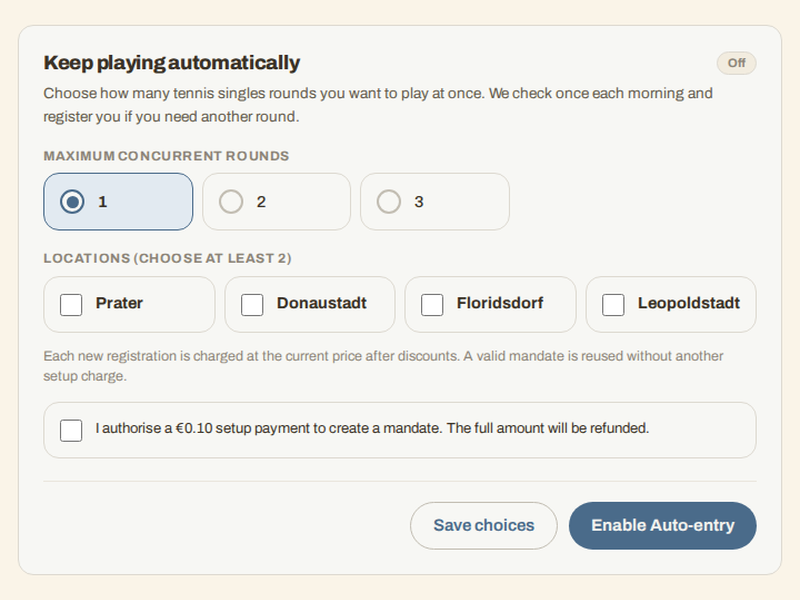
Open “Keep playing automatically” in your profile. Choose at least two locations and a maximum of one, two or three concurrent singles rounds. Your profile needs your full name and a verified email address before you can enable it.
When will I be registered for another round?
After activation and every morning after that, tennis-liga.at checks whether you are below your round limit. If a paid registration is already waiting for a round, it will not add another one.
Registration does not mean a round starts immediately. You still wait for suitable opponents. Auto-entry covers tennis singles rounds; you arrange match times and book courts with your opponents yourself.
What does Auto-entry cost, and how do I turn it off?
Each new registration is charged at the current round price after your discounts. There is no monthly flat fee. An existing valid payment mandate is reused. If you need a new mandate, you explicitly consent to a €0.10 setup payment, which is refunded in full.
You can switch Auto-entry off in the same profile section. This does not cancel payments already submitted. If an automatic payment fails or the mandate is invalid, Auto-entry is switched off. You receive an email linking to your settings. Check them before enabling it again.